“Variable as boxes” is not the right metaphor to understand reference variable in OOP languages and here’s why. Let’s consider this code:
a = [1, 2, 3]b = a
Create a list [1, 2, 3] and bind the variable a to it;
Bind the variable b to the same value that a is referencing.
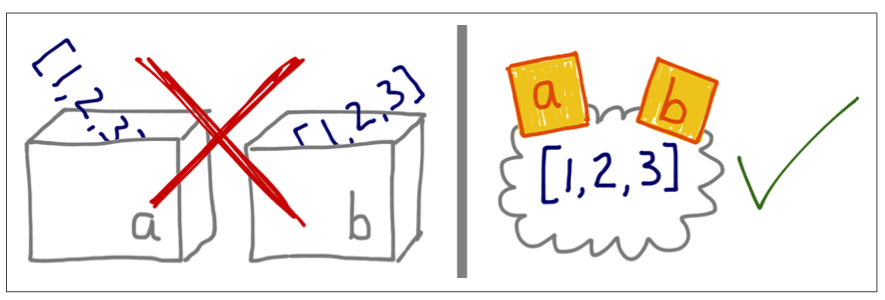
If you imagine variables are like boxes, you can’t make sense of assignment in Python; instead, think variables as sticky notes, as the following image shows:
If we consider it this way, the output of the following code, which might seem strange at first, is actually perfectly explainable:
>>> a = [1, 2, 3]>>> b = a>>> a.append(4)>>> b[1, 2, 3, 4]
Indeed, the b = a statement does not copy the contents of box a into box b. Instead, it attaches the label b to the object that already has the label a.
The Assignment Statement Syntax
Details about assignment statement syntax here. Very shortly: Variable assignment in Python involves storing the reference (memory address) of the object in the left-hand variable. This step creates a new variable if it doesn’t already exist or updates the reference of an existing variable to point to a new object.
When we see a = "hello" we would say: “Variable a is assigned to the string "hello"” and not “The string "hello" is assigned to the variable a”. That’s because the object "hello" is created before the assignment, and we’ll prove that in the next piece of code.
Since the verb “to assign” is used in contradictory ways, a useful alternative is “to bind”: Python assignment statement x = ... binds the x variable (or label) to the object created or referenced on the right-hand side. And, again, the object must exists before a name can be bound do it, as this example will prove:
Gizmo id: 4584236384
Gizmo id: 4584237776
---------------------------------------------------------------------------
TypeError                                 Traceback (most recent call last)
Cell In[68], line 6
      3         print(f"Gizmo id: {id(self)}")
      5 x = Gizmo()
----> 6 y = Gizmo()*10

TypeError: unsupported operand type(s) for *: 'Gizmo' and 'int'
The first class instantiation works as expected.
The second class instantiation is the proof that the second Gizmo was actually instantiated before the multiplication was attempted, and the variable y was never created.
Identity, Equality, and Aliases
Because variables are mere labels, nothing prevents an object from having several labels assigned to it. When that happens, you have aliasing. Here’s an example:
>>> charles = {'name': 'Charles L. Dodgson', 'born': 1832}>>> lewis = charles>>> lewis is charlesTrue>>> id(charles), id(lewis)(11765609536, 11765609536)>>> lewis['balance'] = 950>>> charles{'name': 'Charles L. Dodgson', 'born': 1832, 'balance': 950}
Line 2: lewis is an alias for charles.
Line 3 - Line 5: the is operator and the id function confirm it.
Line 7: adding an item to lewis is the same as adding an item to charles.
That is an example of Aliasing.
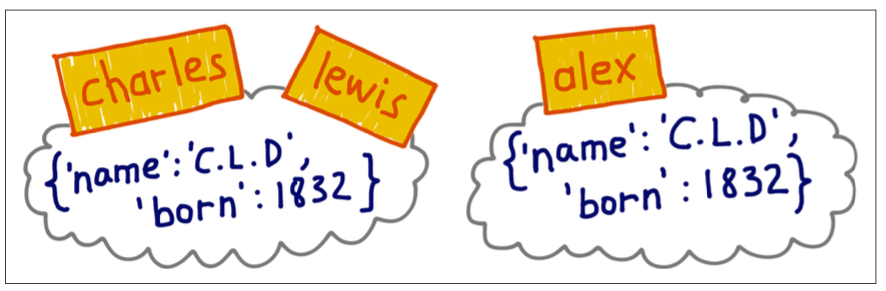
Let’s suppose an impostor - called Dr. Alexander - claims he is Charles L. Dodgson born in 1832. Here’s the current situation:
Let’s represent this situation with code:
>>> alex = {'name': 'Charles L. Dodgson', 'born': 1832}>>> alex == charlesTrue>>> alex is charlesFalse
charles and lewis are bound to the same object;
alex is bound to a separate object of equal value.
So, alex == charles returns True because of the __eq__ implementation in the dict class (Equality), but they’re distinct objects and that is proved by the False returned by alex is charles.
To sum up:
lewis and charles are aliases since these two variables are bound to the same object.
alex is not an alias for charles since these two variables are bound to different object.
An object’s identity never changes once it’s created; […]. The is operator compares the identity of two objects. The id() function returns an integer representing its identity.
The real meaning of the integer value returned by the id() function is implementation dependent. In CPython, id() returns the memory address of the object, but it may be something else in another Python interpreter. Regardless of the specific meaning, the ID value returned by this function is guarantee to be a unique integer label, and it will never change during the life of the object.
Choosing between == and is
The == operator compares the values of objects (the data they hold);
The is operator compares their identities (the integer value returned by the id() function). While programming, we are often interested in object equality than identity, so == appears more frequently than is in Python code. However, if you are comparing a variable to a singleton, it makes sense to use is. The most common case (maybe the only common case) is checking whether a variable is bound to None.
The is operator is faster than ==, because it cannot be overloaded (TODO: maybe overridden??), so Python does not have to find and invoke special methods to evaluate it.
The == operator is syntactic sugar for a.__eq__(b). The __eq__ method inherited from object compared object IDs, so it produces the same result as is. But most built-in types override __eq__ method with more meaningful implementation that takes into account the values of the object attributes.
The Relative Immutability of Tuple
Tuples, like most Python collections - like lists, dict, sets, etc. - are containers: they hold references to objects. in contrast, flat sequences like str, bytes, and array.array directly hold their contents (characters, bytes, and numbers) in contiguous memory. If the referenced items are mutable, they may change even if the tuple itself does not.
Attention
In other words, the Immutability of Tuples really refers to the physical content of the tuple data structure that corresponds to the references it holds, and does not extend to the referenced objects.
Let’s explore a situation where the value of the tuple changes, but not the identity of the items it contains:
As expected, l1 and l2 compare equal, but they’re different objects.
Using the constructor or [:] produces a shallow copy, meaning that the outermost container is duplicated, but the copy is filled with references to the same items held by the original container. If these items are mutable items, this may lead to unpleasant surprises.
Line 4: both l1 and l2 are affected becausel1[1] is a list (mutable) and the operator += changes the list in place;
Line 7: both l1 and l2 are affected because l2[1] is a list (mutable) and the operator += changes the list in place;
Line 8: only l2 is affected because l2[2] is a tuple (immutable) and the operator += creates a new tuple and rebind the variable l2[2] to this new tuple.
Here’s an amazing interactive tool that helps us to graphically visualize this process step by step:
Deep and Shallow Copies of Arbitrary Objects
Sometimes you need to make deep copies, meaning duplicates that do not share references of embedded objects. The copy module provides the deepcopy and copy functions that return deep and shallow copies of arbitrary objects.
It’s clear that, if I modify a mutable object of list1, only list2 is affected because it’s a shallow copy while list3 is not affected because it’s a deep copy.
Here’s again the interactive tool:
Function Parameters as References
The only mode of parameter passing in Python is Call by Sharing.
Call by Sharing
Call by Sharing means that each formal parameter of the function gets a copy of each reference in the arguments. In other words, the parameters inside the function become aliases of the actual arguments.
(The above one is the explanation contained in the book, but honestly I don’t like it. The following is an explanation found on the web that looks more clear to me.)
In Python, arguments are passed By Assignment, which means that the function parameters are assigned the values of the arguments that are passed to them. Whether the argument is passed by value or by reference depends on the type of the argument:
Immutable objects (like strings, integers, tuples) are passed by value. This means that when you pass an immutable object to a function, a copy of the object is created, and the function works with this copy rather than the original object. Any changes made to the copy will not affect the original object:
Before:
x = 1
y = 2
--------------------
After:
x = 1
y = 2
result1 = 3
In this example, x is an integer object (which is immutable), and it is passed to the f function. Inside the function, a copy of x is created, and the copy is modified by adding 1 to it. However, the original x object remains unchanged, and when the function is done, the modified copy is discarded.
Mutable objects (like lists, dictionaries, sets) are passed by reference. This means that when you pass a mutable object to a function, the function receives a reference to the original object. Any changes made to the object inside the function will affect the original object:
That’s what happens with mutable objects: since function f has an in-place operator, it changed list1 because it’s mutable (look at line 6). Before fixing this issue, we’ll show another related problem and then we’ll show a solution for both issues.
Mutable Types as Parameter Default: Bad Idea!
You should avoid mutable objects as default values for parameters. That’s because each default value is evaluated when the function is defined (i.e. usually when the module is loaded) and the default values become attributes of the function object. So, if a default value is a mutable object, and you change it, the change will affect every future call of the function.
Here’s an example (this example is not taken from the book. The following one is much simpler to understand.):
First call: [1]
Second call: [1, 2]
Third call: [1, 2, 3]
First Call: When the function is called with append_to_list(1), it appends 1 to the list and returns [1].
Second Call: When the function is called again with append_to_list(2), it appends 2 to the existing list (which already contains [1]) and returns [1, 2] instead of [2].
Third Call: Similarly, when called with append_to_list(3), it appends 3 to the list which now contains [1, 2], resulting in [1, 2, 3].
Problem: When my_list is given a default value of an empty list, it becomes an alias (=a reference) to that list object. After the first function call, my_list contains [1]. So, on subsequent calls, my_list is no longer empty! As a result, the second call to the function sees my_list as [1] instead of an empty list.
Solution (not the real solution)
To avoid this issue, use None as the default value and initialize the mutable object inside the function:
First call: [90, 91, 92, 1]
Second call: [90, 91, 92, 1, 2]
Third call: [90, 91, 92, 1, 2, 3]
The problem now is the same as before: my_list becomes an alias for existing_list. So, since at the end of the first iteration my_list is equal to [90, 91, 92, 1], even existing_list becomes now equal to [90, 91, 92, 1].
Solution (the real solution)
To fix this second scenario the solution is simple: if my_list is provided, it should be initialized with a copy of that list:
First call: [90, 91, 92, 1]
Second call: [90, 91, 92, 2]
Third call: [90, 91, 92, 3]
We have finally fixed both scenarios: using an empty list as the default argument and passing an existing list to the function.
del and Garbage Collection
"Data Model" chapter of The Python Language Reference
Objects are never explicitly destroyed; however, when they become unreachable they may be garbage-collected.
Some things to know:
del is not a function, it’s a statement. Indeed we write del x and not del(x) (although the latter also works, but only because the expressions x and (x) usually means the same thing in Python.
del deletes references, not objects. Python’s Garbage Collector may discard an object from memory as an indirect result of del, if the deleted variable was the last reference to the object
Here’s an example of del usage:
>>> a = [1,2]>>> b = a>>> del a>>> b[1, 2]>>> b = [3]
Line 1 & 2: create object [1, 2] and bind a and b to it.
Line 3: delete reference a.
Line 6: rebinding b to the new object [3] removes the last remaining reference to [1, 2]. Now the garbage collector can discard that object.
In CPython, the primary algorithm for garbage collection is reference counting. Essentially, each object keeps count of how many references point to it. As soon as that refcount reaches zero, the object is immediately destroyed. For a further investigation, look at [How Variables works in Python VIDEO TODO: add].
 Let’s represent this situation with code: