Sequences in Python (such as strings, bytes, lists, tuples, arrays, etc.) result share a rich set of common operations, including iteration, slicing, sorting, and concatenation.
The standard library offers a rich selection of sequence types implemented in C:
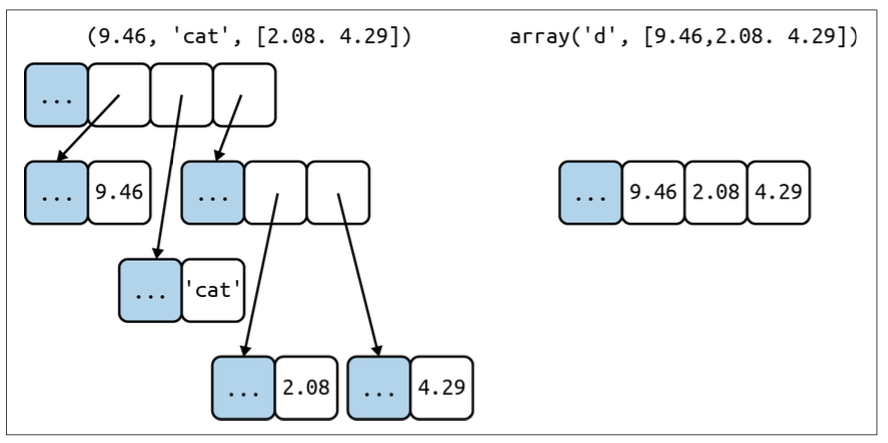
Container Sequences: can hold items of different types, including nested containers (i.e. list, tuple, collections.deque); they hold references to the objects they contain in their own memory space.
Flat Sequences: can hold items of one simple type (i.e. str, bytes, array.array); they contain the value of its contents in their own memory space.
Let’s see the simplified memory diagrams for a tuple and an array:
Another way of grouping sequence types is by mutability:
Mutable Sequences: like list, bytearray, array.array and collections.deque;
Immutable Sequences: like tuple, str, and bytes.
A Mutable Object is an object that can have its value modified in-place.
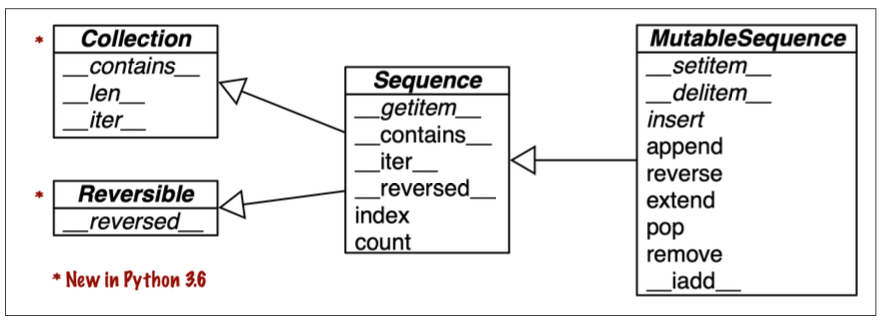
Here’s how mutable sequences (MutableSequence) inherit all methods from immutable sequences (Sequence) and implement several additional methods:
Note that the built-in concrete sequence types (list, tuple, etc) do not actually subclass the Sequence and MutableSequence abstract base classes, but they’re virtual subclasses (Chapter 13) registered with those ABCs. Being virtual subclasses, tuple and list pass these tests with issubclass() function:
>>> from collections import abc>>> issubclass(tuple, abc.Sequence)True>>> issubclass(list, abc.MutableSequence)True
2. List Comprehensions and Generator Expressions
A quick way to build a sequence is using a List Comprehensions (aka listcomps) if the target is a list, or a Generator Expression (aka genexps) for other kind of sequences.
2.1. List Comprehensions and Readability
list is the most fundamental sequence type. Here’s a list created with classic for loop:
symbols = '$c£p`≠'codes = []for symbol in symbols: codes.append(ord(symbol))
and here’s a list created with a List Comprehension:
codes = [ord(symbol) for symbol in symbols]
The codes variable will be in both cases:
[36, 99, 163, 112, 96, 8800]
List Comprehensions build lists from sequences or any other iterable type by filtering and transforming items. Indeed, the filter and map built-ins can be composed to do the same, but readability suffers, as we’ll see now.
2.2. Listcomps Versus map and filter
Let’s create the same list once using list comprehensions and then using filter and map functions:
With list comprehension:
beyond_ascii = [ord(s) for s in symbols if ord(s) > 127]
With filter and map functions:
beyond_ascii = list(filter(lambda symbol: symbol > 127, map(ord, symbols)))
2.3. Cartesian Products
List comprehensions can be used to generate lists based on the Cartesian product of two or more iterables. The Cartesian product is the set of all possible pairs (or tuples) formed by picking one element from each iterable:
>>> colors = ["black", "white"]>>> sizes = ["S", "M", "L"]>>> [(color, size) for color in colors for size in sizes][('black', 'S'), ('black', 'M'), ('black', 'L'), ('white', 'S'), ('white', 'M'), ('white', 'L')]
2.4. Generator Expressions
To initialize tuples, arrays, and other types of sequences you could start from a listcomp, but a generator comprehension (aka generator expressions) saves memory because it yields items one by one using the iterator protocol instead of building a whole list:
import arraysymbols = '$c£p`≠'tuple_instance = tuple(ord(symbol) for symbol in symbols)array_instance = array.array("I", (ord(symbol) for symbol in symbols))print(tuple_instance)print(array_instance)
Note that the first argument of the array constructor defines the storage type used for the numbers in the array (I in our case).
Note that Chapter 17 (TODO: add link after studying that chapter) explains how Generators work in detail. Here the idea was just to show the use of generator expressions to initialize sequences other than lists, or to produce output that you don’t need to keep in memory.
3. Tuples are not just Immutable Lists
Tuples as “immutable lists” is a simplification. Tuple can be used:
as records with no field names (overlooked case)
as immutable lists
3.1. Tuple as Records with no field names
Tuple holds records: each item in the tuple holds the data for one field, and the position of the item gives its meaning. This means that the number of items is usually fixed and their order is always important. Indeed, if you think of Tuples just as immutable lists, the order of the items may or may not be important, and that’s not the case.
Note that in both expression, sorting the tuple would destroy the information.
3.2. Tuple as Immutable Lists
Two benefits:
Clarity: when you see a tuple in code, you know its length will never change;
Performance: a tuple uses less memory than a list of the same length, and it allows Python to do some optimizations.
Attention
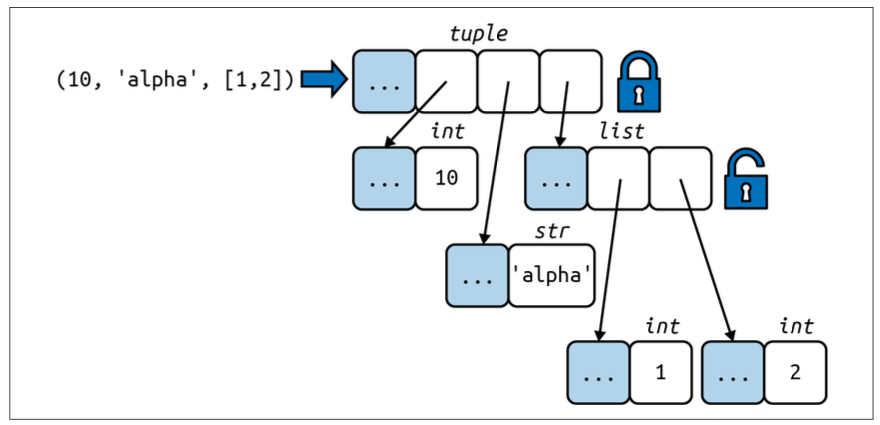
The immutability of a tuple only applies to the references contained in it. References in a tuple cannot be deleted or replaced. But, if one of those references points to a mutable object (like a list), and that object is changed, then the value of the tuple changes. Here’s a visual representation:
Let’s explore more in detail this concept of immutability expressed in the orange box:
Tuples with mutable object items can be source of bugs.
As we’ll see later on, an object is only Hashable if its value cannot ever change. An Unhashable Tuple cannot be used as a key in a dict or as an element in a set. If you want to determine explicitly if a tuple (or any object) has a fixed value, you can use the hash built-in (we explore this issue further in The Relative Immutability of Tuple):
>>> a = (10, 'alpha', [1,2])
>>> fixed()
False

>>> b = (10, 'alpha', (1,2))
>>> fixed(b)
True

>>> c = (10, 'alpha', {'key1': "value1"})
>>> fixed(c)
False

>>> d = (10, 'alpha', {'key2': [0,1]})
>>> fixed(d)
False

>>> e = (10, 'alpha', 99)
>>> fixed(e)
True
Performance advantages of using Tuple as immutable lists are explained by Python Core developer at this link link here. To summarize:
To evaluate a tuple literal, the Python compiler generates bytecode for a tuple constant in one operation; but, for a list literal, the generated bytecode pushes each element as a separate constant to the data stack, and then builds the list.
Given a tuple t, tuple(t) simply returns a reference to the same t, so there’s no need to copy. In contrast, given a list l, the list(l) constructor must create a new copy of l.
Because of its fixed length, a tuple instance is allocated the exact memory space it needs. Instance of lists, on the other hand, are allocated with room to spare, to amortize the cost of future appends:
The references to the items in a tuple are stored in an array in the tuple struct, while a list holds a pointer to an array of references stored elsewhere. This indirection is necessary because when a list grows beyond the space currently allocated, Python needs to reallocate the array of references to make room.
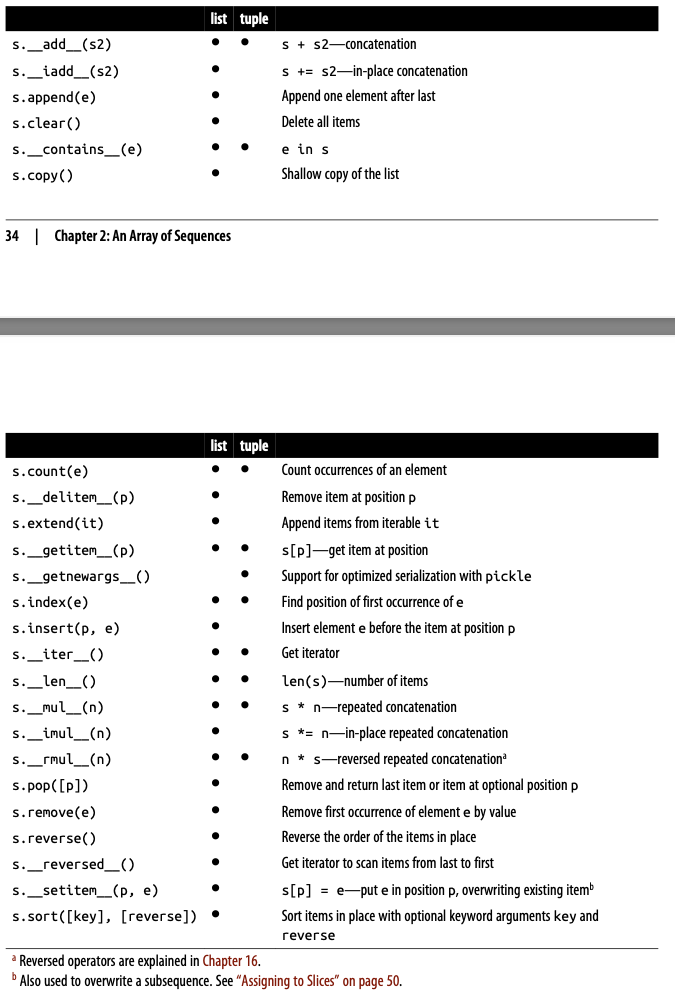
Note that list and tuple have different APIs:
4. Unpacking Sequences and Iterables
Unpacking is important because it avoids unnecessary and error-prone use of indexes to extract elements from sequences. Unpacking works with any iterable object as the data source - including iterators, which don’t support index notation.
The most visible form of unpacking is Parallel Assignment: assign items from an iterable to a tuple of variables:
Defining function parameters with *args to grab arbitrary excess positional arguments is a classic Python feature. This idea was extended to apply to parallel assignment:
>>> a, b, *rest = range(5)>>> a, b, rest(0, 1, [2, 3, 4])>>> a, b, *rest = range(3)>>> a, b, rest(0, 1, [2])>>> a, b, *rest = range(2)>>> a, b, rest(0, 1, [])>>> a, *body, c, d = range(5)>>> a, body, c, d(0, [1, 2], 3, 4)>>> *head, b, c, d = range(5)>>> head, b, c, d([0, 1], 2, 3, 4)
4.2. Unpacking with * in Function Calls and Sequence Literals
(I honestly didn’t get the examples on the book, so I’ll write what I think is better.)
PEP 448 introduced more flexible syntax for iterable unpacking and a similar new syntax for ** which we’ll see later on (TODO: insert an hyperlink as soon as you study that chapter).
When calling a function, you can use the * operator to unpack a list or tuple into individual arguments. This is particularly useful when you want to pass a collection of arguments to a function without having to specify each one individually. For example:
def add(a, b, c): return a + b + cargs = [1, 2, 3]result = add(*args)print(result) # Output: 6
The* can also be used when defining list, tuple, or set literals:
A common feature of list, tuple, and str, and all sequence types in Python is the support of Slicing Operations. We’ll discuss some advanced use-cases.
6.1. Why Slices and Ranges Exclude the Last Item
The Pythonic convention of excluding the last item in slices and ranges works well with zero-based indexing used in Python, C, and many other languages. Convenient features:
it’s easy to see the length of a slice or range when only the stop position is given. For example both range(3) and my_list[:3] produce three items;
it’s easy to compute the length of a slice or range when start and stop are given: stop - start. For example:
(This basic explanation of :: usage is taken from ChatGPT; I just needed a compact and concise way to show a basic usage of this operator.)
We can use slicing to access a subset of sequence by specifying a range of indices. The basic syntax for slicing is:
sequence[start:stop:step]
where:
start is the index where the slice starts (inclusive);
stop is the index where the slice ends (exclusive);
step is the interval between elements in the slice (optional).
Considering lst = [0, 1, 2, 3, 4, 5], let’s see some common patterns with the :: operator:
Omitting start, stop, and step: its means “take the entire sequence”:
>>> lst[::][0, 1, 2, 3, 4, 5]
Using the step element: this will iterate through the entire sequence, but skip elements according to the step value:
>>> lst[::2][0, 2, 4]>>> lst[::3][0, 3]
Reversing a sequence: reverse a sequence using a negative step:
>>> lst[::-1][5, 4, 3, 2, 1, 0]
Specifying start or stop with step: You can still specify a start or stop along with the step:
>>> lst[1::2][1, 3, 5]>>> lst[:4:2][0, 2]
The notation sequence[start:stop:step] produces a slice object: slice(start:stop:step). As we’ll see in How Slicing works (TODO: add hyperlink in the future), to evaluate the expression sequence[start:stop:step], Python calls sequence.__getitem__(slice(start, stop, step)). This is interesting because it allows us to assign names to slices and a potential use case could be parsing a flat-file data by naming slices:
The [] operator can also take multiple indexes or slices separated by commas. The __getitem__ and __setitem__ special methods that handle the [] operator simply receive the indices in a[i, j] as a tuple. For example, to evaluate a[i, j], Python calls a.__getitem__((i, j)).
The built-in sequence types in Python are one-dimensional (except for memoryview), so they support only one index or slice.
However, multidimensional indexing and slicing are commonly used in external package, like NumPy. In NumPy it’s possible to create multidimensional objects called numpy.ndarray. For instance, we can fetched two-dimensional items in a numpy.ndarray using the syntax a[i, j] or we can extract a two-dimensional slice using the syntax a[m:n, k:l].
(Ellispis: TODO. not so interesting)
7. Using + and * with Sequences
Python sequences support + and * operators. Let’s see both of them.
Usually both operands of + must be of the same sequence type:
Note the weird result. This happens because the outer list (wrong_complete_list) is made of three references to the same inner list. Basically, all the three nested lists are aliases referring to the same object. To make it more explicit, let’s write the corresponding code with for loop:
The behaviour of the augmented assignment operators+= and *= is much different depending on the operand is applied on.
Let’s show the details of +=, but these considerations are the same for *=.
The special method that make += work is __iadd__ (for “in-place addition”) [for *= is __imul__]. If __iadd__ is not implemented, Python calls __add__. Let’s consider a += b:
if a is a mutable sequence, a will be changed in place
if a is an immutable sequence, a new object a will be created because that expression is the same as a = a + b.
Lines 3-8: after applying the operator += on a mutable sequence, that sequence is modified in place.
Lines 14-20: after applying the operator += on an immutable sequence, a new object with the same name is created.
7.3. A += Assignment Puzzler
Let’s run this code and then we’ll make some observations:
>>> t = (1, 2, [30, 40])>>> t[2] += [50, 60]TypeError: 'tuple' object does not support item assignment>>> t(1, 2, [30, 40, 50, 60])
This is a weird result. What’s happened:
TypeError is raised;
t becomes (1, 2, [30, 40, 50, 60]).
If we looked at the bytecode Python generates for the expression s[a] += b, it would become clearer what happens, but honestly, I don’t want to go into these details. The take-home messages are:
avoid putting mutable items in tuples;
augmented assignment is not an atomic operation - we just saw it throwing an exception after doing part of its job (What does that mean? It’s not so clear to me).
Note
Although finding working code is not the main focus of this topic, we will provide the correct code to insert new elements into a list within a tuple:
The list.sort() method sorts a list in place - that is, without making a copy and it doesn’t create a new list.
It returns None to remind us that it changes the receiver (the receiver is the target of a method call, a list object in this case).
Python Convention
The last bullet point above recalls an important Python API convention: functions or methods that changes an object in place should return None (or NoneType???) to make it clear to the caller that the receiver was changes and no new object was created.
Drawback: we cannot cascade calls to those methods. In contrast, methods that return new objects can be cascaded in the fluent interface style (look at Fluent Interface).
8.2. sorted(list)
The built-in function sorted()creates a new list and returns it.
It accepts any iterable object as an argument, including immutable sequences and generators.
Python Sorting Algorithm is stable, meaning that it preserves the relative ordering of items that compare equally. For example: