dict type is a fundamental part of Python’s implementation. Many constructs in Python are represented by dictionaries in memory. Due to their importance, Python dictionaries are highly optimized and Hash Tables are the engines behind Python’s high performance dictionaries.
Other built-in types based on hash tables are set and frozenset that have a richer APIs compared to sets in other programming languages.
1. Modern dict syntax
1.1. dict Comprehensions
A dictcomp (dict comprehension) builds a dict instance by taking key:value pairs from ant iterable and the syntax derives from listcomps and genexps.
Let’s make a simple example:
dial_codes = [
    (880, 'Bangladesh'),
    (55, 'Brazil'),
    (86, 'China'),
    (62, 'Indonesia')
]

country_dial = {country: code for (code, country) in dial_codes}
ountry_dial_2 = {code: country.upper() for country, code in sorted(country_dial.items()) if code < 70}
Then:
>>> country_dial
{'Bangladesh': 880, 'Brazil': 55, 'China': 86, 'Indonesia': 62}

>>> country_dial_2
{55: 'BRAZIL', 62: 'INDONESIA'}
Note that we could pass the iterable dial_codes directly to the dict() constructor, but with the dict comprehension we swapped the country and the code.
1.2. Unpacking Mappings
PEP 448 enhanced the support of mapping unpackings in two ways:
-
we can apply
**to more than one argument in a function call; this works if the keys are all strings and unique across all arguments (because duplicate keyword arguments are fobidden):>>> def dumps(**kwargs): ... return kwargs >>> dumps(**{'x': 3, 'y': 10}, z='4', **{'s': 15}) {'x': 3, 'y': 10, 'z': '4', 's': 15} >>> dumps(**{'x': 3, 'y': 10}, z='4', **{'x': 15}) TypeError: __main__.dumps() got multiple values for keyword argument 'x' -
**can be used inside adictliteral (in this case duplicates are allowed and later occurrences overwrite previous ones):>>> {**{'x': 3, 'y': 10}, 'z': '4', **{'s': 15}} {'x': 15, 'y': 10, 'z': '4'}
1.3. Merging Mappings with |
Python 3.9 supports | and |= to merge mappings.
The | operator creates a new mapping:
>>> d1 = {'a': 1, 'b': 2}
>>> d2 = {'x': 10, 'a': 20}

>>> d1 | d2
{'a': 20, 'b': 2, 'x': 10}
The |= operator updates an existing mapping in-place:
>>> d1
{'a': 1, 'b': 2}

>>> d1 |= d2
>>> d1
{'a': 20, 'b': 2, 'x': 10}
3. Standard API for Mapping Types
The collections.abc module provides the Mapping and MutableMapping abstract class describing the interfaces of dict and similar types:
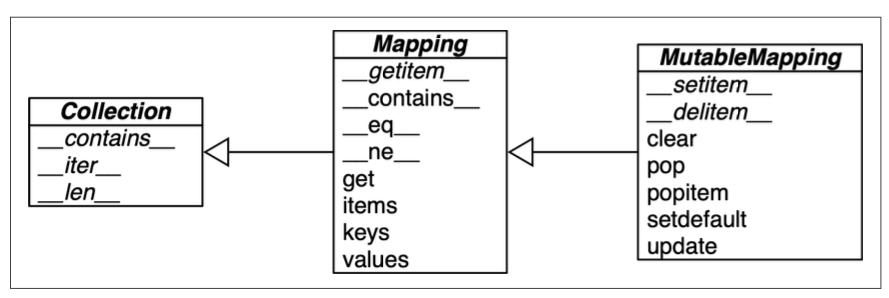
>>> from collections.abc import Mapping, MutableMapping

>>> my_dict = {}
>>> isinstance(my_dict, Mapping)
True

>>> isinstance(my_dict, MutableMapping)
True
Note that using isinstance with an abstract class is often better then checking whether a function argument is of the concrete dict type, because then alternative mapping types can be used (Chapter 13 TODO TOUNDERSTAND).
To implement a custom mapping, it’s easier to extend the concrete class collections.UserDict from the standard library, instead of subclassing those abstract class. That’s because it encaspulate the basic dict in its implementation, which in turn is built on hash table. The limitation is that the key must be hashable.
3.1. What is Hashable
This is the definition of Hashable adopted by the Python Glossary:
Cite
An object is hashable if it has a hash value which never changes during its lifetime (it needs a
__hash__()method), and can be compared to other objects (it needs an__eq__()method). Hashable objects which compare equal must have the same hash value. […] and their hash value is derived from theirid().
Some info:
- numeric type,
str, andbytesare all hashable; - container types are hashable is they are immutabl and all contained objects are also hashable;
- a
frozenset is always hashable, because every element contained must be hashable by definition; - a
tupleis hashable only if all its elements are hashable; - user-defined types are hashable by default (WHY? TODO on the book).
>>> tt = (1, 2, (30, 40))
>>> hash()
-3907003130834322577


>>> tl = (1, 2, [30, 40])
>>> hash(tl)
TypeError: unhashable type: 'list'

>>> tf = (1, 2, frozenset([30, 40]))
>>> hash(tf)
5149391500123939311
3.2. Overview of Common Mapping Methods
Let’s see the methods implemented by dict and two popular variations: defaultdict and OrderedDict, both defined in the collections module:
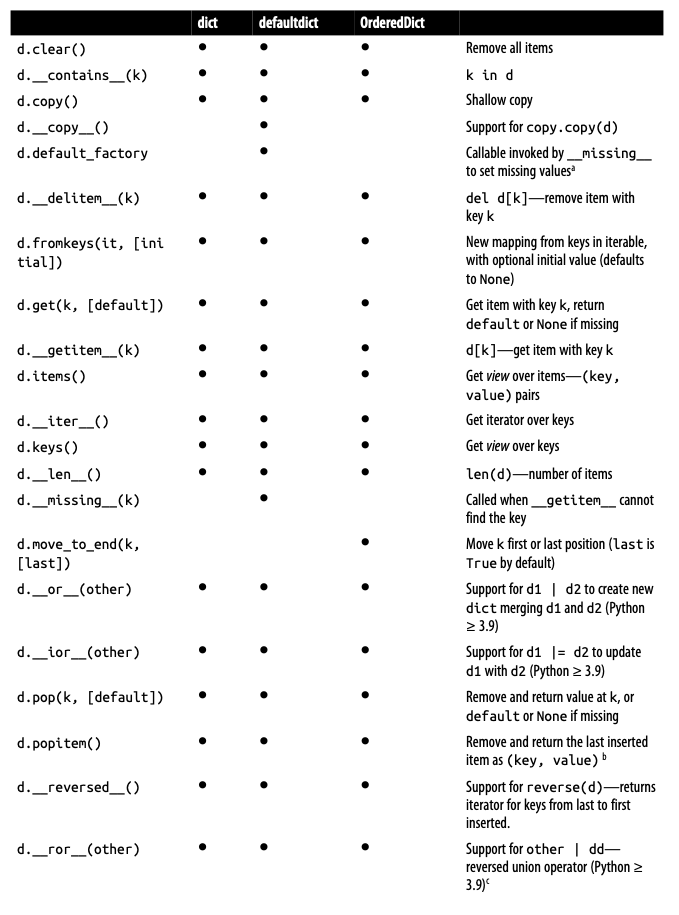
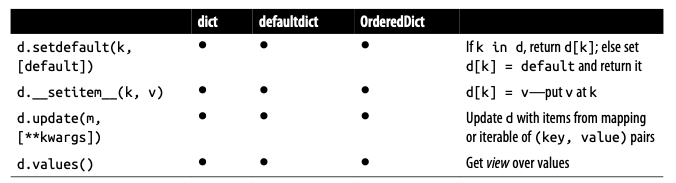
The way d.update(m) handles the argument m is a proper example of duck typing: if first checks whether m has a keys() method and, if it does, assumes it is a mapping. Otherwise, update() falls back to iterating over m, assuming its items are (key, value) pairs. Let’s see the most common cases:
mis a mapping type:
>>> d1 = {'a': 1, 'b': 2}
>>> d2 = {'b': 3, 'c': 4}
>>> d1.update(d2)
>>> d1
{'a': 1, 'b': 3, 'c': 4}mis a list of tuples:
>>> d = {'a': 1}
>>> list_of_tuples = [('b', 2), ('c', 3)]
>>> d.update(list_of_tuples)
>>> d
{'a': 1, 'b': 2, 'c': 3}mis a tuple of tuples:
>>> d = {'a': 1}
>>> tuple_of_tuples = (('b', 2), ('c', 3))
>>> d.update(tuple_of_tuples)
>>> d
{'a': 1, 'b': 2, 'c': 3}
Note that the constructor for most Python mapping uses the same logic of update() internally, which means they can be initialized from other mappings or from any iterable object producing (key, value) pairs:
>>> list_of_tuples = [('b', 2), ('c', 3)]
>>> dict_from_list_of_tuples = dict(list_of_tuples)
>>> dict_from_list_of_tuples
{'b': 2, 'c': 3}

>>> tuple_of_tuples = (('b', 2), ('c', 3))
>>> dict_from_tuple_of_tuples = dict(tuple_of_tuples)
>>> dict_from_tuple_of_tuples
{'b': 2, 'c': 3}
3.3. Inserting or Updating Mutable Values
In a dictionary, if you access d[k] when k is not an existing key, it raises a KeyError exception. An alternative to set a default value is d.get(k, default_value) that allows us not to deal with a KeyError.
However, there’s a better way to go when you want to retrieve a mutable value and want to update it, that is by using setdefault() method of mapping types. By definition d.setdefault(k, [default]) does the following: if k in d, return d[k], else set d[k] = default and return it.
Say we want to create a script to index text, meaning that I want a mapping where:
- each key is a word
- the value is a list of positions where that word occurs (line_number, column_number)
Basically, the output must be like:
a [(19, 48), (20, 53)]
and [(15, 23)]
are [(21, 12)]
Let’s write a first version of this script using dict.get() and we’ll show that it’s not the best solution:
import re

WORD_RE = re.compile(r'\w+')

index = {}
with open("find_word_test.txt", encoding='utf-8') as fp:
    for line_no, line in enumerate(fp, 1):
        for match in WORD_RE.finditer(line):
            word = match.group()
            column_no = match.start() + 1
            location = (line_no, column_no)

            occurrences = index.get(word, [])
            occurrences.append(location)
            index[word] = occurrences

for word in sorted(index, key=str.upper):
print(word, index[word])- Line 13: get the list of occurrences for
wordor[]if not found; - Line 14: append new location to
occurrences; - Line 15: put changed
occurrencesintoindexdict.
Note that you cannot say: occurrences = index.get(word, []).append(location) due to the Python convention to return a NoneType when an in-place function is run, as we already said in 8.1. list.sort() chapter.
These three lines, though, can be replaced by a single line using dict.setdefault:
import re

WORD_RE = re.compile(r'\w+')

index = {}
with open("find_word_test.txt", encoding='utf-8') as fp:
    for line_no, line in enumerate(fp, 1):
        for match in WORD_RE.finditer(line):
            word = match.group()
            column_no = match.start() + 1
            location = (line_no, column_no)

            index.setdefault(word, []).append(location)

for word in sorted(index, key=str.upper):
print(word, index[word])- Line 13: get the list of occurrences for
wordor set it to[]if not found;setdefaultreturns the value, so it can be updated.
In other words, the following code with setdefault() function:
key = "key1"
new_value = "new_value"

my_dict.setdefault(key, []).append(new_value)
is the same as returning:
key = "key1"
new_value = "new_value"

if key not in my_dict:
	my_dict[key] = []
my_dict[key].append(new_value)
4. Automatic handling of Missing Keys
There are two main approaches to deal with mapping types that don’t have the key we are looking for:
- using the
defaultdictcontainer fromcollectionsmodule; - subclassing
dictor any other mapping type and add__missing__method.
4.1. defaultdict: another take on Missing Keys
A defaultdict in Python is a specialized subclass of the built-in dict, where a default value is automatically assigned to a key that doesn’t exist in the dictionary. When instantiating a defaultdict, you provide a callable to produce a default value whenever __getitem__ is passed a nonexistent key argument.
Let’s give a first example:
>>> from collections import defaultdict

>>> count = defaultdict(int)
>>> count['apple'] += 1

>>> count
defaultdict(<class 'int'>, {'apple': 1})defaultdictwithintas default factory (0for missing keys);- If
appledoesn’t exist, it’s initialized to0, then incremented.
Let’s give another example:
>>> grouped_words = defaultdict(list)
>>> grouped_words['fruits'].append('apple')

>>> grouped_words
defaultdict(<class 'list'>, {'fruits': ['apple']})defaultdictwithlistas default factory;fruitskey automatically gets an empty list, thenappleis added.
With defaultdict class we can update the script we created in the previous chapter:
import re
from collections import defaultdict

WORD_RE = re.compile(r'\w+')

index = defaultdict(list)
with open("find_word_test.txt", encoding='utf-8') as fp:
    for line_no, line in enumerate(fp, 1):
        for match in WORD_RE.finditer(line):
            word = match.group()
            column_no = match.start() + 1
            location = (line_no, column_no)

            index[word].append(location)

for word in sorted(index, key=str.upper):
    print(word, index[word])
4.2. The __missing__ method
As mentioned above, __missing__ method is a way mappings deal with missing keys. This method is not defined in the base dict class, but, if you subclass dict and provide a __missing__ method, the standard dict.__getitem__ will call it whenever a key is not found, instead of raising a KeyError.
Suppose we want a mapping (an instance of a class that we call PowerfulDictionary, which we’ll define in a moment) where keys are converted to str when looked up; basically I want a mapping that I can lookup either with a str key and the corresponding int:
>>> d = PowerfulDictionary([("2", "two"), ("4", "four")])

>>> d["2"]
'two'

>>> d[4]
'four'

>>> d.get("2")
'two'

>>> d.get(4)
'four'

>>> d.get(1, 'N/A')
'N/A'

>>> 2 in d
True

>>> 1 in d
False
So, let’s create this new class PowerfulDictionary and a new instance of this class:
class PowerfulDictionary(dict):
    def __missing__(self, key):
        if isinstance(key, str):
            raise KeyError(key)
        return self[str(key)]

    def get(self, key, default=None):
        try:
            return self[key]
        except KeyError:
            return default

    def __contains__(self, key):
        return key in self.keys() or str(key) in self.keys()

d = PowerfulDictionary([("2", "two"), ("4", "four")])- Line 1: this class inherits from
dict. - Line 3: check whether
keyis already astr. - Line 5: build
strfromkeyand look it up. - Line 9: without this custom
get, if you usegeton a key that’s not in the dictionary, Python would fall back to the standarddict.getbehavior, which does not trigger the__missing__method. Here’s the difference:- Without the custom
get:d = PowerfulDictionary([("2", "two"), ("4", "four")]) # Using get on a missing key print(d.get(2)) # Output: None # `__missing__` is not called because `dict.get` bypasses `__getitem__` and `__missing__`.
- With the Custom
get:d = PowerfulDictionary([("2", "two"), ("4", "four")]) # Using get on a missing key print(d.get(2)) # Output: "two" # Custom `get` ensures that the `__getitem__` logic (and thus `__missing__`) is used.
- Without the custom
- Line 11: if a
KeyErrorwas raised,__missing__already failed, so we return thedefault. - Line 14: search for unmodified key (the instance may contain non-
strkeys), then for astrbuilt from the key.
Let’s explain why the test isinstance(key, str) is necessary in the __missing__ implementation. Without the isinstance(key, str) check, consider what happens when a non-string key that cannot be converted to an existing key is accessed:
__getitem__is called whenself[key]is used.- If
keyisn’t found, Python calls__missing__(key). - In
__missing__,self[str(key)]is evaluated. - This triggers
__getitem__withstr(key)as the key. - If
str(key)isn’t found, Python calls__missing__again withstr(key). - This loop continues forever, causing infinite recursion.
The line if isinstance(key, str): raise KeyError(key) ensures that once a string key is missing, recursion stops. Here’s why:
- If
keyis already a string and not found, raisingKeyErrorprevents__missing__from being called again withstr(key). - If
keyis not a string, the code triesself[str(key)]. - If
str(key)still doesn’t exist,__missing__is triggered again, but nowkeyis a string, soKeyErroris raised, stopping the recursion.
5. Variations of dict
Besides defaultdict that we already covered, there are other mapping types in the standard library.
5.1. collections.OrderedDict
Since Python 3.6 the built-in dict mapping keeps the keys ordered. This means that if you iterate over a dictionary or convert it to a list of keys (e.g., list(d.keys())), the order will match the order in which the keys were added. Because of that, the most common reason to use OrderedDict is writing code that is backward compatible with earlier Python versions.
Actually, there are other differences between dict and OrderedDict, so check on the web if you want to find out them.
5.2. collections.ChainMap
A ChainMap instance holds a list of mappings that can be searched as one. The lookup is performed on each input mapping in the order it appears in the constructor call, and succeeds as soon as the key is found in one of those mappings. The ChainMap instance does not copy the input mappings, but holds references to them. For example:
from collections import ChainMap

d1 = dict(a=1, b=3)
d2 = dict(a=2, b=4, c=6)

chain = ChainMap(d1, d2)

print(chain['a']) # Output: 1
print(chain['c']) # Output: 6
Updates and insertions to a ChainMap only affect the first input mapping:
>>> chain['c'] = -1
>>> d1
{'a': 1, 'b': 3, 'c': -1}

>>> d2
{'a': 2, 'b': 4, 'c': 6}
5.3. collections.Counter
A Counter instance holds an integer count for each key. This is used to count instances of hashable objects. One of the most common method is most_common([n]), which returns an ordered list of tuples wit the n most common items and their counts (if there are some objects with the same count value, they appear in order). For example:
>>> from collections import Counter

>>> ct = Counter("abracadabra")
>>> ct
Counter({'a': 5, 'b': 2, 'r': 2, 'c': 1, 'd': 1})

>>> ct.update("aaaaazzz")
>>> ct
Counter({'a': 10, 'z': 3, 'b': 2, 'r': 2, 'c': 1, 'd': 1})

ct.most_common(3)
[('a', 10), ('z', 3), ('b', 2)]
5.5. Subclassing UserDict instead of dict
If you want to create a new mapping type, it’s better to do it by extending collections.UserDict rather than dict. The main reason why it’s better is that dict has some implementation shortcuts that end up forcing us to override methods that we can just inherit from UserDict with no problems (more details in a paragraph of chapter 14 “Subclassing Built-in Types is tricky” [TODO: add link when it’s ready]).
Note that UserDict does not inherit from dict, but it uses composition.
Now let’s built a new version of PowerfulDictionary that we build earlier by extending from UserDict rather than dict:
- it will be more concise
- it stores all keys as
str
from collections import UserDict

class PowerfulDictionary_2(UserDict):
    def __missing__(self, key):
        if isinstance(key, str):
            raise KeyError(key)
        return self[str(key)]

    def __contains__(self, key):
        return str(key) in self.data

    def __setitem__(self, key, item):
        self.data[str(key)] = item

ud = PowerfulDictionary_2([("2", "two"), ("4", "four")]) # {'2': 'two', '4': 'four'}
7. Dictionary views
The dict instance methods .keys(), .values(), and .items() return instances of classes called dict_keys, dict_values, and dict_items, respectively. These are called dictionary views and they are read-only projections of internal data structures used in the dict implementation. They avoid memory overhead of the equivalent Python 2 methods that returned lists duplicating data already in the target dict.
Let’s see some basic operations supported by all dictionary views:
>>> d = dict(a=10, b=20, c=30)
>>> values = d.values()

>>> values
dict_values([10, 20, 30])

>>> len(values)
3

>>> list(values)
[10, 20, 30]

>>> reversed(values)
<dict_reversevalueiterator at 0x1064595d0>

>>> values[0]
TypeError: 'dict_values' object is not subscriptable- Line 5: the
reprof aa view object shows its content. - Line 7: we can query the
lenof a view. - Line 10: views are iterable, so it’s easy to create lists from them.
- Line 13: views implement
__reversed__, returning a custom iterator. - Line 16: we can’t use
[]to get individual items from a view.
A view object is a dynamic view (or a dynamic proxy) on the dictionary’s entries, which means that when the dictionary changes, the view reflects these changes:
>>> d["z"] = 99

>>> values
dict_values([10, 20, 30, 99])
Some differences between these dictionary views:
dict_valuesis the simplest one because it implements only the__len__,__iter__, and__reversed__special methods.dict_keysanddict_itemsimplement the previous special methods and also several set methods that we’ll see in one of the next paragraph “Set Operations on dict Views” [TODO: add link].
8. Practical Consequences of How dict works
The hash table implementation of Python’s dict is very efficient, but it’s important to understand the practical effects of this design:
- keys must be hashable objects (they must implement proper
__hash__and__eq__methods as already explained in 3.1. What is Hashable); - items access by key is very fast;
- key ordering is preserved as a side effect of a more compact memory layout for
dictin CPython 3.6; - despite its new compact layouts, dicts inevitable have a significant memory overhead;
- to save memory, avoid creating instance attributes outside of the
__init__method.
TODO: this practical effects are not clear if we don’t know details of the dict layout. Maybe something is explained here: https://www.fluentpython.com/extra/internals-of-sets-and-dicts/
9. Set Theory
Set types (we consider both set and its immutable sibling frozenset as Sets) first appeared as modules in the Python 2.3 standard library, and then they were promoted to built-ins in Python 2.6.
A set is a collection of unique objects. A basic use case is removing duplication:
>>> l = ['spam', 'spam', 'eggs', 'spam', 'bacon', 'eggs']
>>> set(l)
{'bacon', 'eggs', 'spam'}

>>> list(set(l))
['eggs', 'bacon', 'spam']
If you want to remove duplicates and also preserve the order of the first occurrence of each item, you can use a plain dict to do it:
>>> dict.fromkeys(l).keys()
dict_keys(['spam', 'eggs', 'bacon'])

>>> list(dict.fromkeys(l).keys())
['spam', 'eggs', 'bacon']
Set elements must be hashable:
- the
settype is not hashable, so you can’t build asetwith nestedsetinstances; - the
frozensettype is hashable, so you can build asetwith nestedfrozensetinstances.
In addition to enforcing uniqueness, the set types implement many set operations as infix operators:
a | breturns their union;a & breturns the intersection;a - breturns the difference;a ^ breturns the symmetric difference.
For example, imagine you have a large set of email addresses (the haystack) and a smaller set of addresses (the needles) and you need to count how many needles occur in the haystack. You can simply use the & operator:
>>> haystack = set(["email1", "email2", "email3", "email4"])
>>> needles = set(["email2", "email3"])

>>> len(haystack & needles)
2
The alternative would be much more verbose:
found = 0
for n in haystack:
    if n in needles:
        found += 1

# found is 2
Note that this last example works for any iterable objects, while the previous sets objects. However, you can build sets on the fly:
found = len(set(needles)) & set(haystack)

# another way:
found = len(set(needles).intersection(haystack))
A note on performance: Thanks to their underlying hash table implementation, lookups in sets are extremely fast, taking only 0.3 microseconds to search for an element. Here’s a comparison between a set and a list for finding an element among 1,000,000 objects:
import timeit
import random

# Generate a big list and a big set
size = 10**6
big_list = list(range(size))
big_set = set(big_list)

# Generate random elements to look up
elements_to_lookup = [random.randint(0, size-1) for _ in range(1000)]

# Define lookup functions
def list_lookup():
    return any(element in big_list for element in elements_to_lookup)

def set_lookup():
    return any(element in big_set for element in elements_to_lookup)

# Measure lookup time
list_lookup_time = timeit.timeit(list_lookup, number=10)
set_lookup_time = timeit.timeit(set_lookup, number=10)

print(f"List lookup time: {list_lookup_time:.6f} seconds")
print(f"Set lookup time: {set_lookup_time:.6f} seconds")
Output:
List lookup time: 0.010839 seconds
Set lookup time: 0.000003 seconds
9.1. Set Literals
-
The syntax of
setliterals looks exactly like the math notation, with the exception that there’s no literal notation for the emptyset, so we useset():>>> s = {1} >>> type(s) <class 'set'> >>> s {1} >>> s.pop() 1 >>> s set()Literal
setsyntax like{1, 2, 3}is both faster and more readable than calling the constructorset([1, 2, 3])because, to evaluate it, in the latter form Python has to look up thesetname to fetch the constructor, then build a list, and finally pass it to the constructor. Here’s the bytecode of both forms:>>> import dis >>> dis.dis('{1}') 1 0 LOAD_CONST 0 (1) 2 BUILD_SET 1 4 RETURN_VALUE >>> dis.dis('set([1])') 1 0 LOAD_NAME 0 (set) 2 LOAD_CONST 0 (1) 4 BUILD_LIST 1 6 CALL_FUNCTION 1 8 RETURN_VALUE -
The syntax of
frozensetliterals is very simple:>>> frozenset(range(10)) frozenset({0, 1, 2, 3, 4, 5, 6, 7, 8, 9})
9.2. Set Comprehensions
Set Comprehensions (or setcomps) were added in Python 2.7 and their usage is very similar to the other comprehensions-like structure:
>>> from unicodedata import name
>>> {chr(i) for i in range(32, 256) if "SIGN" in name(chr(i), '')}
{'#', '$', '%', '+', '<', '=', '>', '¢', '£', '¤', '¥', '§', '©', '¬', '®', '°', '±', 'µ', '¶', '×', '÷'}
10. Practical Consequences of How Sets work
TODO. as in the 8. Practical Consequences of How dict works maybe it’s better to look at https://www.fluentpython.com/extra/internals-of-sets-and-dicts/ before and then try to read these chapters again.
11. Set Operations on dict Views
The following table shows that the view objects dict_keys and dict_values are similar to frozenset:
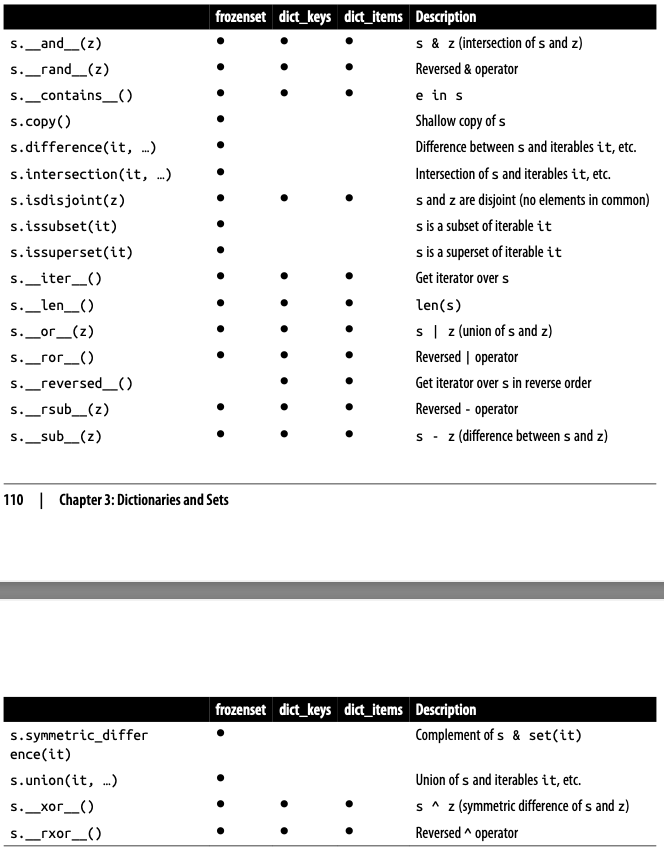
In particular, dict_keys, and dict_items implement the special methods to support the powerful set operators &, |, -, and ^. However, note that the return value will be a set:
>>> d1 = dict(a=1, b=2, c=3, d=4)
>>> d2 = dict(b=20, d=40, e=50)

>>> d1.keys() & d2.keys()
{'b', 'd'}
Furthermore, the set operators in dictionary views are compatible with set instances:
>>> s = {'a', 'e', 'i'}
>>> d1.keys() & s
{'a'}
Note that a dict_items view only works as a set if all values in the dict are hashable while dict_keys view can always be used as a set because every key is already hashable by definition.