Data Class is a Python data structure that we use to build a simple class that is just a collection of fields, with little or no extra functionality
We’ll see three different class builders that we can use to build data classes:
collections.namedtuple
typing.NamedTuple
@dataclasses.dataclass
Attention
typing.TypedDict may seem like another data class builders. However, TypedDict does not build concrete classes that you can instantiate. It’s just syntax to write type hints for function parameters and variables that will accept mapping values used as records, with keys as field names.
1. Overview of Data Class Builders
Let’s consider a simple class and show its limitation and then we’ll rewrite it with the three solutions mentioned above:
class Coordinate: def __init__(self, lat, lon): self.lat = lat self.lon = lonmoscow = Coordinate(55.76, 37.62)location = Coordinate(55.76, 37.62)
The “Alternative 2” in the above example is much more readable but there’s another even more readable way we can use. Indeed, since Python 3.6, typing.NamedTuple can also be used in a class statement, with type annotations. This is indeed much more readable, and makes it easy to override methods or add new one:
from typing import NamedTupleclass Coordinate(NamedTuple): lat: float lon: float def __str__(self): ns = "N" if self.lat >= 0 else "S" we = "E" if self.lon >= 0 else "W" return f"{abs(self.lat):.1f}°{ns}, {abs(self.lon):.1f}°{we}"
Info
Although NamedTuple appears in the class statement as a superclass, it’s actually not:
Note that this is not the result i got in my Jupyter notebook. The expression issubclass(Coordinate, NamedTuple) returns an error to me. This “error” is also present in the “Unconfirmed Errata” of this book on the O’Reilly website.
1.3. @dataclasses.dataclass implementation
The class built with @dataclasses.dataclass method is a subclass of object:
from dataclasses import dataclass@dataclassclass Coordinate: lat: float lon: float def __str__(self) -> str: ns = "N" if self.lat >= 0 else "S" we = "E" if self.lon >= 0 else "W" return f"{abs(self.lat):.1f}°{ns}, {abs(self.lon):.1f}°{we}"moscow = Coordinate(55.76, 37.62)location = Coordinate(55.76, 37.62)
Of course, even in this third case, the output is the same as the both collection.namedtuple and typing.NamedTuple cases:
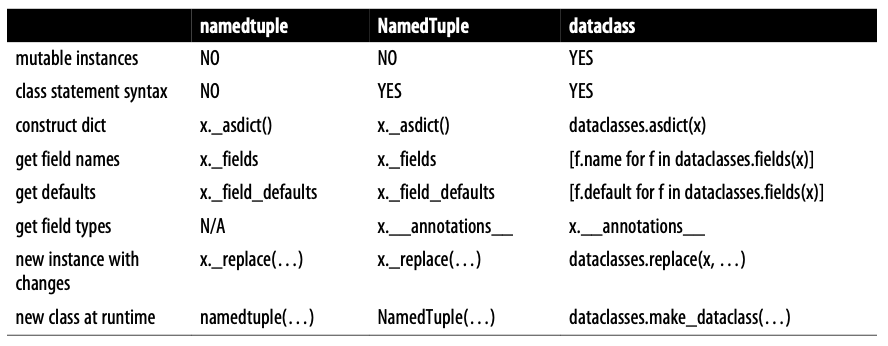
The following table summarises the similarities between these three data class builders:
Mutable Instances
Both collections.namedtuple and typing.NamedTuple build tuple subclasses, therefore the instances are immutable.
By default, @dataclassproduces mutable classes. When frozen=True, the class will raise an exception if you try to assign a value to a field after the instance is initialized.
Class statement syntax
Only typing.NamedTupleand @dataclass supports regular class statement syntax, making it easier to add methods and docstrings.
Construct dict
Both collections.namedtuple and typing.NamedTuple provide an instance method (._asdict) to construct a dict object from the fields in a data class instance:
@dataclass decorated class uses the fields function from the dataclasses module:
>>> from dataclasses import fields>>> fields(moscow)(Field(name='lat',type=<class 'float'>,default=<dataclasses._MISSING_TYPE object at 0x1032b5b40>,default_factory=<dataclasses._MISSING_TYPE object at 0x1032b5b40>,init=True,repr=True,hash=None,compare=True,metadata=mappingproxy({}),kw_only=False,_field_type=_FIELD), Field(name='lon',type=<class 'float'>,default=<dataclasses._MISSING_TYPE object at 0x1032b5b40>,default_factory=<dataclasses._MISSING_TYPE object at 0x1032b5b40>,init=True,repr=True,hash=None,compare=True,metadata=mappingproxy({}),kw_only=False,_field_type=_FIELD))
Get field types
Class defined by typing.NamedTuple and @dataclass have an __annotations__ attribute holding the type hints for the fields. However it’s not recommended; instead, the recommended best practice is to get information with inspect.get_annotations(MyClass) or typing.get_type_hints(MyClass):
Given a named tuple instance x, the call x._replace(**kwargs) returns a new instance with some attribute values replaced.
The dataclasses.replace(x, **kwargs) does the same for an instance of a dataclass decorated class.
2. Classic Named Tuples
The collections.namedtuple function is a factory that builds subclasses of tuple enhanced with fields names, a class name, and an informative __repr__.
Classes built with namedtuple can be used anywhere where tuples are needed. Each instance of a class takes the same amount of memory as a tuple.
Let’s define a named tuple type:
from collections import namedtupleCity = namedtuple("City", "name country population coordinates")tokyo = City("Tokyo", "JP", 36.933, (35.689722, 139.691667))
In addition to some methods inherited from tuple, such as __eq__, __lt__, a named tuple offers a few useful attributes and methods, such as _fields, _make(iterable), _asdict():
Type Hints, aka Type Annotations, are ways to declare the expected type of function arguments, return values, variables, and attributes.
No Runtime Effect
Type Hints are not enforced at all by the Python bytecode compiler and interpeter. Think about Type Hints as “documentation that can be verified by IDEs and type checkers (such as Mypy)“. That’s because type hints have no impact on the runtime behaviour of Python programs.
Both typing.NamedTuple and @dataclass sue the syntax of variable annotations defined in PEP 526 – Syntax for Variable Annotations. The basic syntax of variable annotation is:
var_name: some_type
where some_type can be:
a concrete class, such as str or Coordinate;
a parametrized collection type, such as list[int], tuple[str, float];
an optional type, such as typing.Optional[str] meaning that the attribute can be a str or None.
You can also define a default value for an attribute, which will be used if the corresponding argument is omitted in the constructor call.
4.1. The meaning of variable Annotations
Even though type hints have no effect at runtime, Python read them when a module is loaded, to build the __annotations__ dictionary.
4.1.1. Plain Class
Let’s start to see this in a simple plain class:
class DemoPlainClass:
    a: int
    b: float = 1.1
    c = 'spam'
a becomes an entry in __annotations__, but doesn’t become a class attribute;
b becomes an entry in __annotations__, and becomes a class attribute;
c doesn’t become an entry in __annotations__, but becomes a class attribute.
Let’s prove all these points:
>>> DemoPlainClass.__annotations__{'a': int, 'b': float}>>> DemoPlainClass.aAttributeError: type object 'DemoPlainClass' has no attribute 'a'>>> DemoPlainClass.b1.1>>> DemoPlainClass.cspam
4.1.2. typing.NamedTuple
Let’s create the same class as before:
from typing import NamedTupleclass DemoNTClass(NamedTuple): a: int b: float = 1.1 c = 'spam'
a becomes an entry in __annotations__, and it become an instance attribute;
b becomes an entry in __annotations__, and becomes an instance attribute;
c doesn’t become an entry in __annotations__, and becomes a class attribute.
Let’s prove all these points:
>>> DemoNTClass.__annotations__{'a': int, 'b': float}>>> DemoNTClass.a_tuplegetter(0, 'Alias for field number 0')>>> DemoNTClass.b_tuplegetter(1, 'Alias for field number 1')>>> DemoNTClass.cspam
As expected we have the same type annotations dictionary as the previous example. However, now we have that typing.NamedTuple creates a and b class attributes (c is just a plain class attribute with the value spam).
(Actually i don’t understand why:
Just a little bit above, you defined a and b as instance attributes, and now class attributes;
DemoNTClass.b doesn’t return 1.1, which is the default value, while DemoNTClass.c does.)
The a and b class attributes are descriptors, an advanced feature. Think of them as similar to property getters: methods that don’t require the explicit call operator () to retrieve an instance attribute. This means that they word as read-only instance attributes, which makes sense when we recall that DemoNTClass instances are just tuples, and tuples are immutable.
4.1.3. @dataclass
Let’s create the same class as before:
from dataclasses import dataclass@dataclassclass DemoDataClass: a: int b: float = 1.1 c = 'spam'
a becomes an entry in __annotations__, and it become an instance attribute controlled by a descriptor;
b becomes an entry in __annotations__, and becomes an instance attribute with a descriptor;
c doesn’t become an entry in __annotations__, and becomes a class attribute.
Now let’s check:
>>> DemoDataClass.__annotations__{'a': int, 'b': float}>>> DemoDataClass.__doc__'DemoDataClass(a: int, b: float = 1.1)'>>> DemoDataClass.aAttributeError: type object 'DemoDataClass' has no attribute 'a'>>> DemoDataClass.b1.1>>> DemoDataClass.c'spam'
The __annotations__ and __doc__ are not surprising;
There is no attribute named a because it will only exists in instances of DemoDataClass and it will be a public attribute that we can get and set, unless the class is frozen. This is in contrast with DemoNTClass, which has a descriptor to get a from the instances as read-only attributes.
But b and c exist as class attributes, with b holding the default value for the b instance attribute, while c is just a class attribute that will not be bound to the instances (Actually, what does that mean? Even in this case c is considered as different as b, but I don’t understand way. Only because c has no type hint? It’s weird if this is the reason.).
Let’s instantiate the DemoDataClass:
>>> dc = DemoDataClass(9)>>> dc.a9>>> dc.b1.1>>> dc.c'spam'
a and b are instance attributes, and c is a class attribute we get via the instance (Again: why?). Remember that a data class instance built via @dataclass is mutable and no type checking is done at runtime:
Note that instances can have their own attributes that don’t appear in the class (z in this case); this is normal Python behaviour. However, to save memory, avoid creating instance attributes outside of the __init__ method (pg. 102).
5. More about @dataclass
5.1. Most common arguments
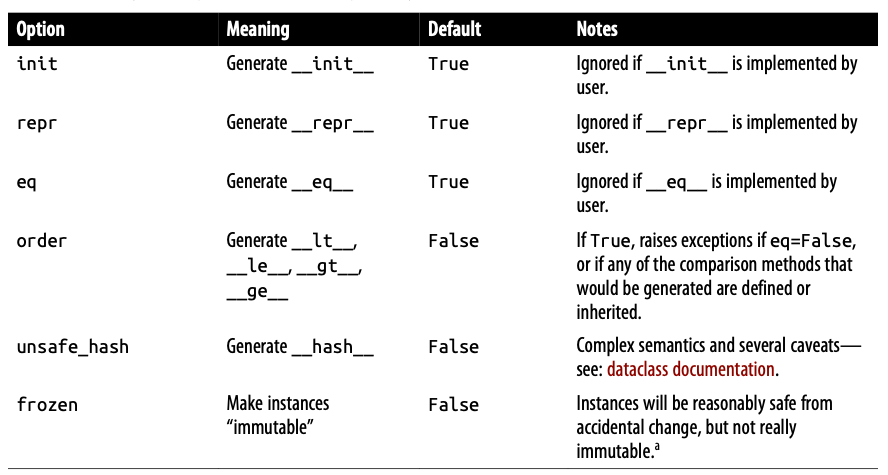
The @dataclass decorator accepts several keyword argument. Its signature is:
Here’s a brief description of each one:
The most commonly used ones are:
frozen=True: protects against accidental changes to the class instance. Though it could be not too hard for programmers to go around the protection afforded by this setting; indeed @dataclass emulates immutability by generating __setattr__ and __delattr__, which raise dataclass.FrozenInstanceError - a subclass of AttributeError - when the user attempts to set or delete a field.
order=True: allows sorting of instances of the data class.
If the eq and frozen arguments are both True, @dataclass produces a suitable __hash__ method, so the instance will be hashable.
Hashable Objects
According to Python Glossary, an object is hashable if it has a hash value which never changes during its lifetime (it needs a __hash__() method), and can be compared to other objects (it needs an __eq__() method). Hashable objects which compare equal must have the same hash value. All immutable objects are hashable, but not all hashable objects are immutable. Click on the link for more details.
5.2. Field Options
Mutable default values are a common source of bugs. In function definitions, a mutable default value is easily corrupted when one invocation of the function mutates the default, changing the behaviour of further invocations (details on Mutable Types as Parameter Default: Bad Idea!). To prevent bugs, @dataclass rejects the class possibility to define default values in their definition:
@dataclassclass ClubMember: game: str guests: list = []
This code returns the following ValueError:
ValueError: mutable default <class 'list'> for field guests is not allowed: use default_factory
A possible solution is to use dataclass.field function with default_factory as argument instead of using a literal (such as []):
from dataclasses import fieldclass ClubMember: game: str guests: list = field(default_factory=list)
The default_factory parameter could be any callable (such as a function, a class, etc.). When provided, it must be a zero-argument callable and it builds a default value each time an instance of the data class is created. This way, each instance of ClubMember will have its own list, avoiding the potential bug we mentioned above.
Potential bugs
Be careful to the fact that @dataclass rejects class definitions only with a list, dict, and set. Other mutable values used as defaults will not be flagged by @dataclass.
Note that we can write the same class by adding a more specific type hint:
class ClubMember:
    game: str
    guests: list[str] = field(default_factory=list)
The syntax list[str] (meaning that guests must be a list of strings) is a new syntax representing a parameterized generic type: since Python 3.9, the list built-in accepts bracket notation to specify the type of the list items. This allows type checker to find potential bugs. Note the prior to Python 3.9, the built-in collections didn’t support generic type notation. So, to parametrize a data structure, you needed to import the corresponding collection types in the typing module (i.e. List[str] with from typing import List).
5.3. Post-init Processing
The __post_init__ method allows you to perform additional actions beyond just initializing a dataclass instance. Common use cases are validation and computing field values based on other fields.
 The most commonly used ones are: